New · Compliance UK construction, trades & manufacturing
Live Self-serve pricing, no scoping call needed. Every employee tracked on your training matrix counts as a seat; admin/management logins don't cost extra on top.

ToolboxIQ: safety records your whole team can keep up to date.

RIDDOR decisions on record, RAMS and risk assessment sign-off, toolbox talks, training and daily checks in one shared record, instead of a laminated folder and a spreadsheet nobody trusts. Software that adapts to how your firm works.

£19 per seat / month, excluding VAT, billed in arrears · plus a one-off onboarding fee (quoted for your setup — get in touch for a figure) · monthly rolling, cancel for the end of any month · drops to £15.83/seat/month automatically after 12 consecutive paid months, no prepayment · tapers down above 20 seats: £15/seat to 50, £12/seat to 100, then price on application · Every employee tracked in ToolboxIQ counts as a seat — including staff who only use the QR/PIN sign-off with no dashboard login. Admin/management logins themselves don't cost extra on top. · how pricing works

◆ No scoping call needed — pay by card or PO once you're signed off, and we'll grant access as soon as that clears. Want to see it running first? book a walkthrough instead.

RIDDOR decisions on recordSOP & RA sign-off matrix✨ Draft with AIToolbox talksIncidents & near missesEquipment / PUWER registerPermits & contractorsSlack digest & screen-recorded evidenceQR codes & translations on requestWorks offlineShared & rugged handsetsExternal courses & certificatesSingle sign-on, set up with your IT team

Works with what you already have: SOPs, risk assessments and toolbox talks entered straight into the app — no CSV import needed to start, though bulk import is there if you want it. Stuck on a blank page instead? "✨ Draft with AI" writes you a first draft from just a topic, ready to review and edit. One shared QR code on the noticeboard shows each person their own outstanding training; a specific document can still get its own QR code right where it's used.

Where your data lives: Hosted for your team in a UK database shared across the IQ apps (Supabase, London, eu-west-2) — your team's data kept apart from every other customer by row-level security. There's no local-only mode: ToolboxIQ's whole point is one shared, always-current record everyone on your team reads from. Security & trust →

Straight answer: ToolboxIQ and AssureIQ both do health & safety assurance — the difference is shape, not rivalry. AssureIQ is the generalist: Safety Pulse, a 5×5 risk matrix and a statutory compliance map for any organisation. ToolboxIQ is built around SOP and Risk Assessment sign-off specifically, plus the shop-floor extras a manufacturer needs on top — equipment inspection cycles, permits to work and contractor management. Run them side by side if you need both; most manufacturing and trades teams start with ToolboxIQ.
ToolboxIQ screenshot
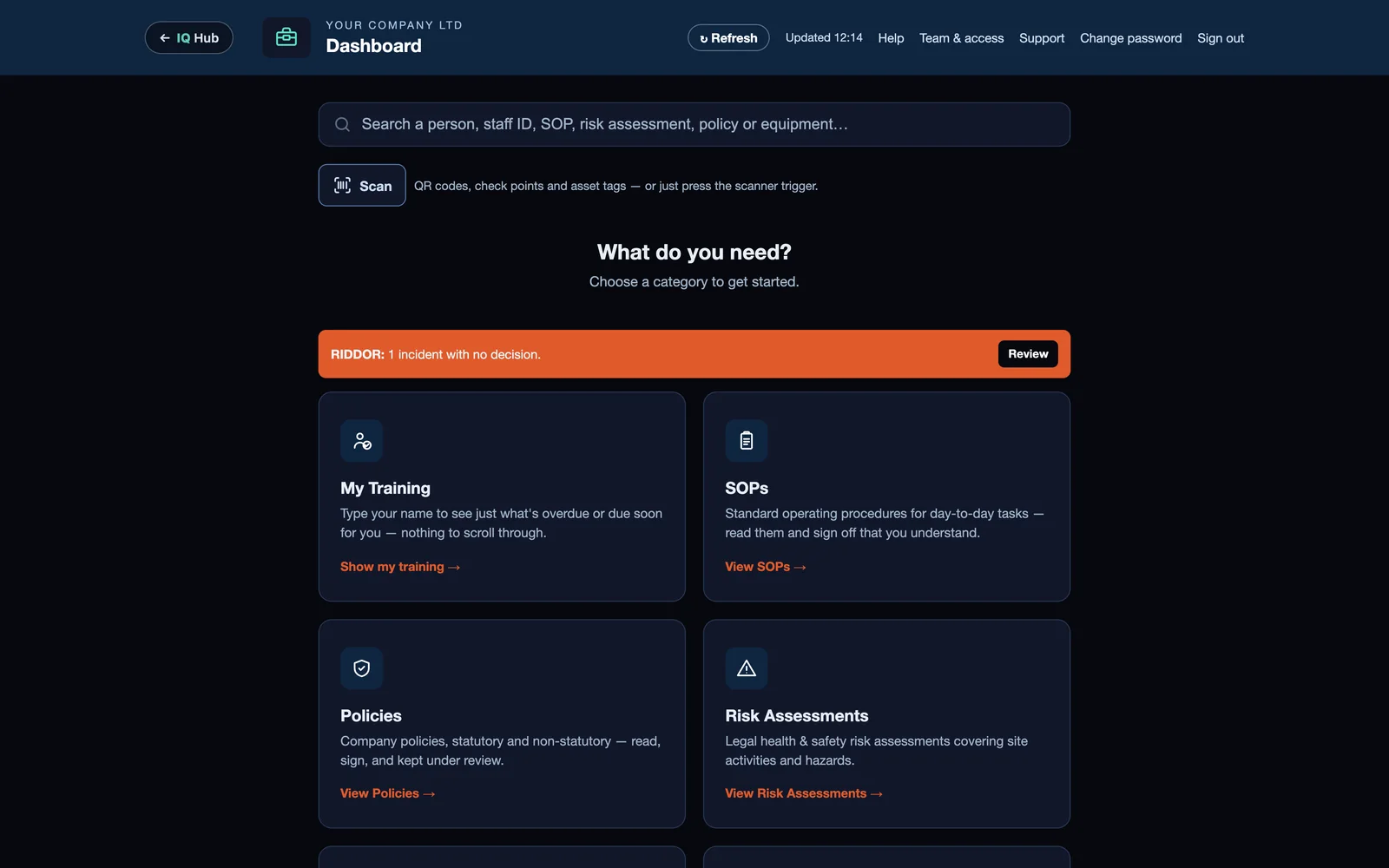
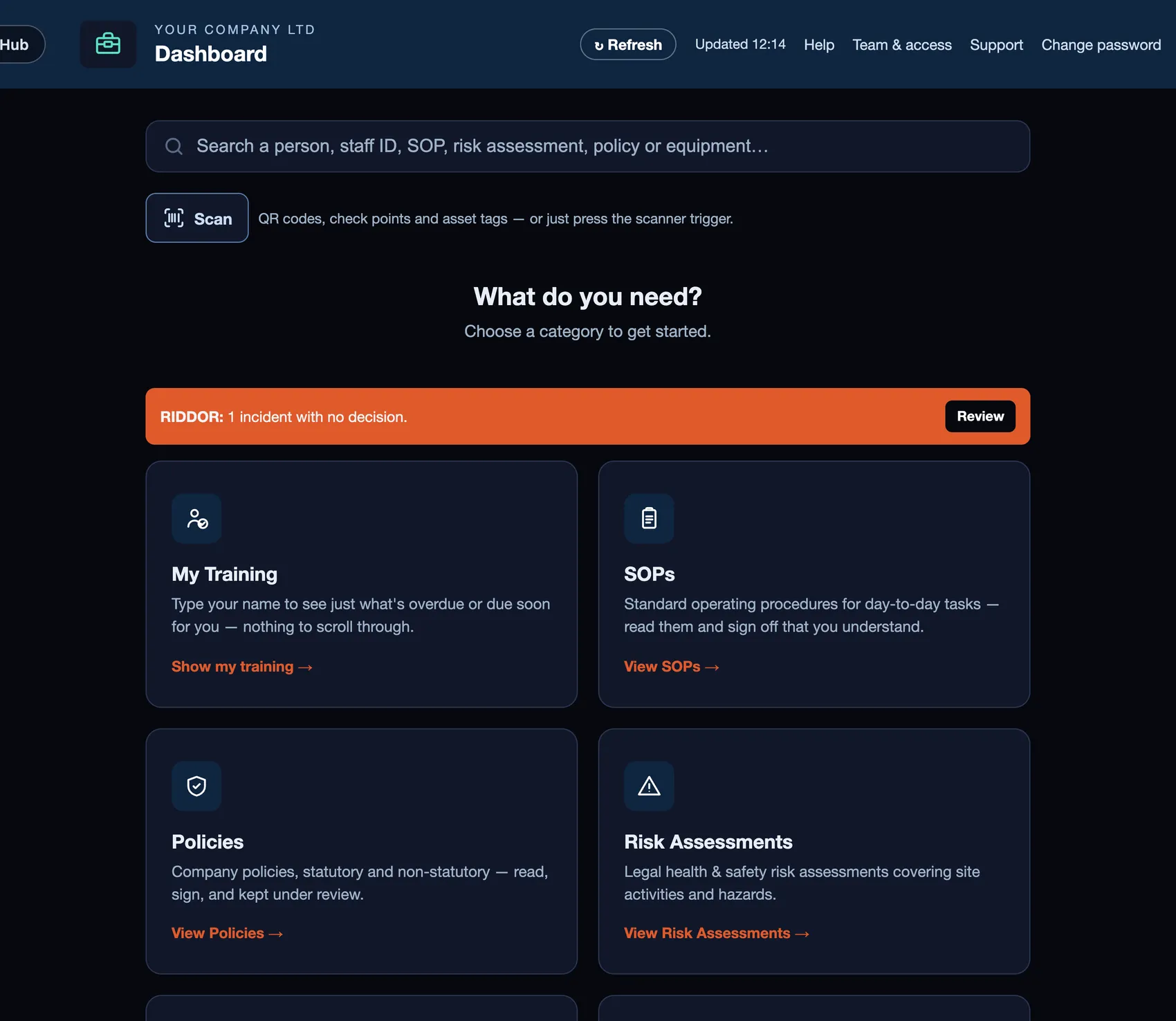
ToolboxIQ — Dashboard

RIDDOR records, RAMS sign-off and toolbox talks in one place.

The six things construction, trades and manufacturing firms ask us about first. Real screens, shown on sample data.

RIDDOR
ToolboxIQ home screen with a RIDDOR incident waiting for a decision (sample data)
RIDDOR decision

RIDDOR: the decision, the reasons and the deadline, on record.

ToolboxIQ suggests whether an incident may be reportable, shows the deadline and the words it relied on, and saves your responsible person's decision with their name and the time. They decide and report to the HSE.

Sign-off
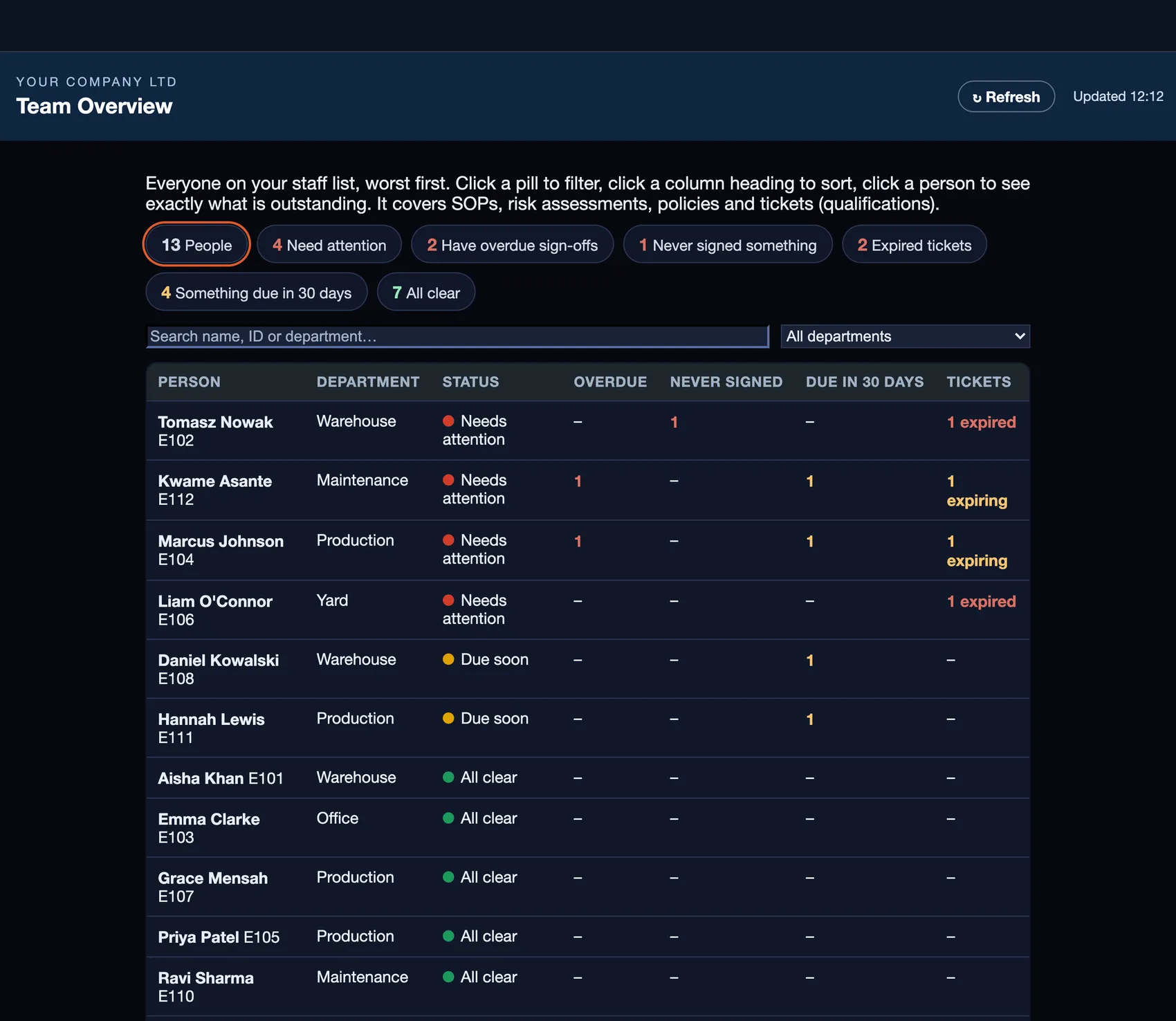
ToolboxIQ Team Overview showing who has signed and who is overdue (sample data)
Who has signed

Every RAMS and risk assessment read, signed and re-confirmed.

See who is current and who is overdue on one screen, with expired tickets and what falls due in 30 days.

Training
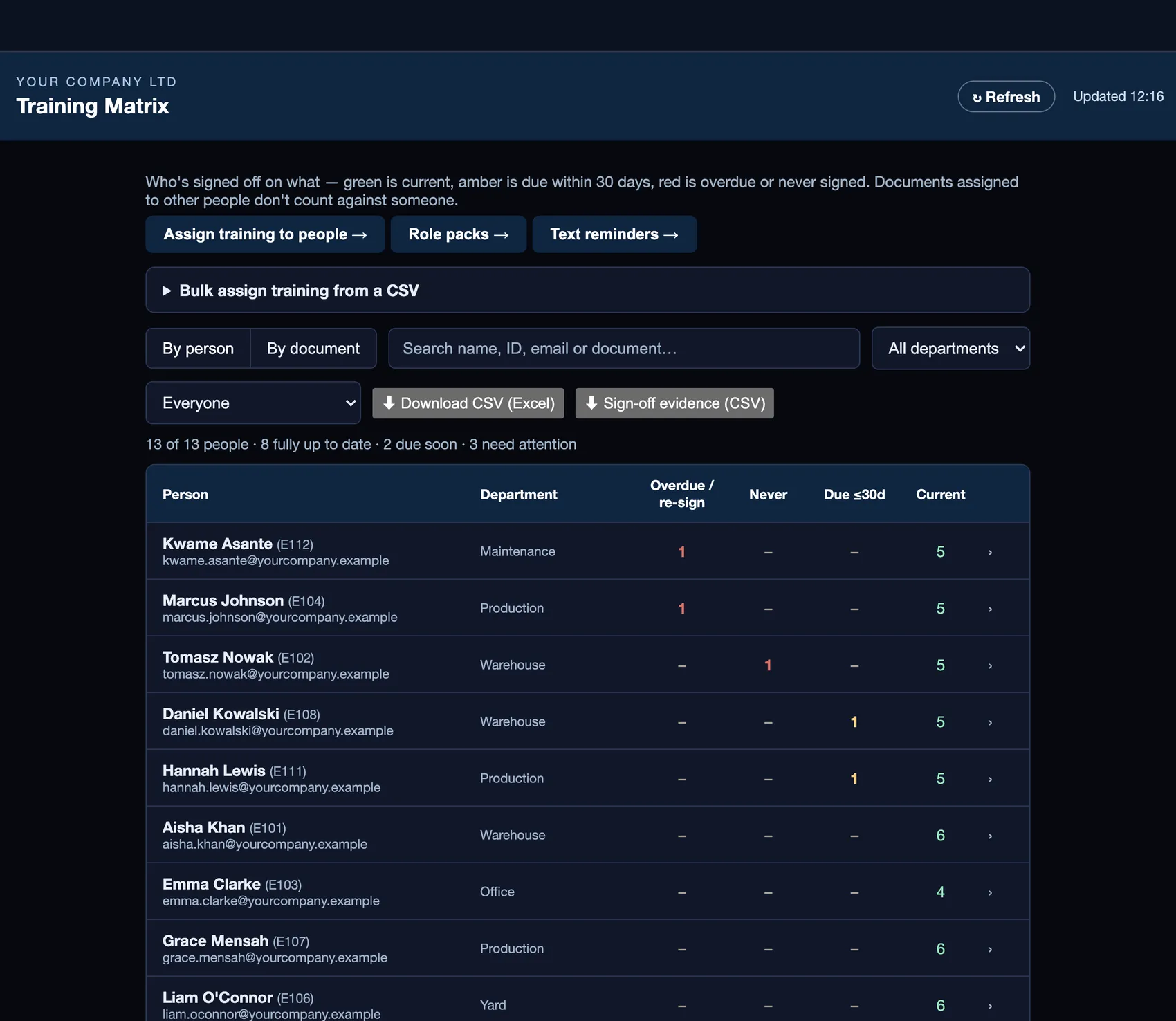
ToolboxIQ training matrix (sample data)
Evidence on demand

Every employee against every document.

Assign by role or in bulk, re-confirmed every three months by default, with a CSV of the sign-off evidence for an auditor or insurer.

Toolbox talks
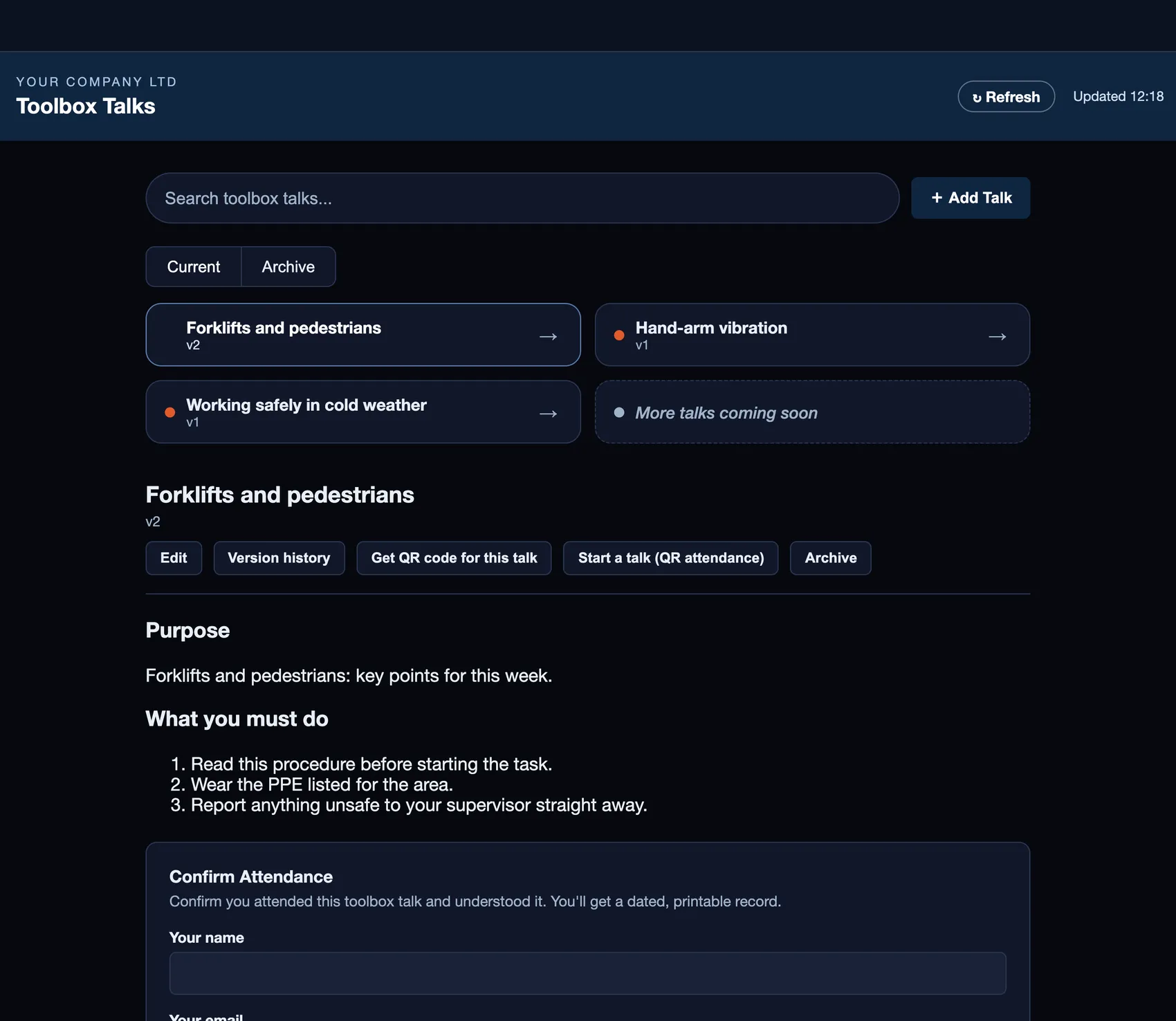
ToolboxIQ toolbox talk with QR attendance (sample data)
QR attendance

Scheduled briefings with an attendance record.

Staff scan a QR code and sign in on their phone, and the attendance list builds itself with the time recorded automatically.

Daily checks
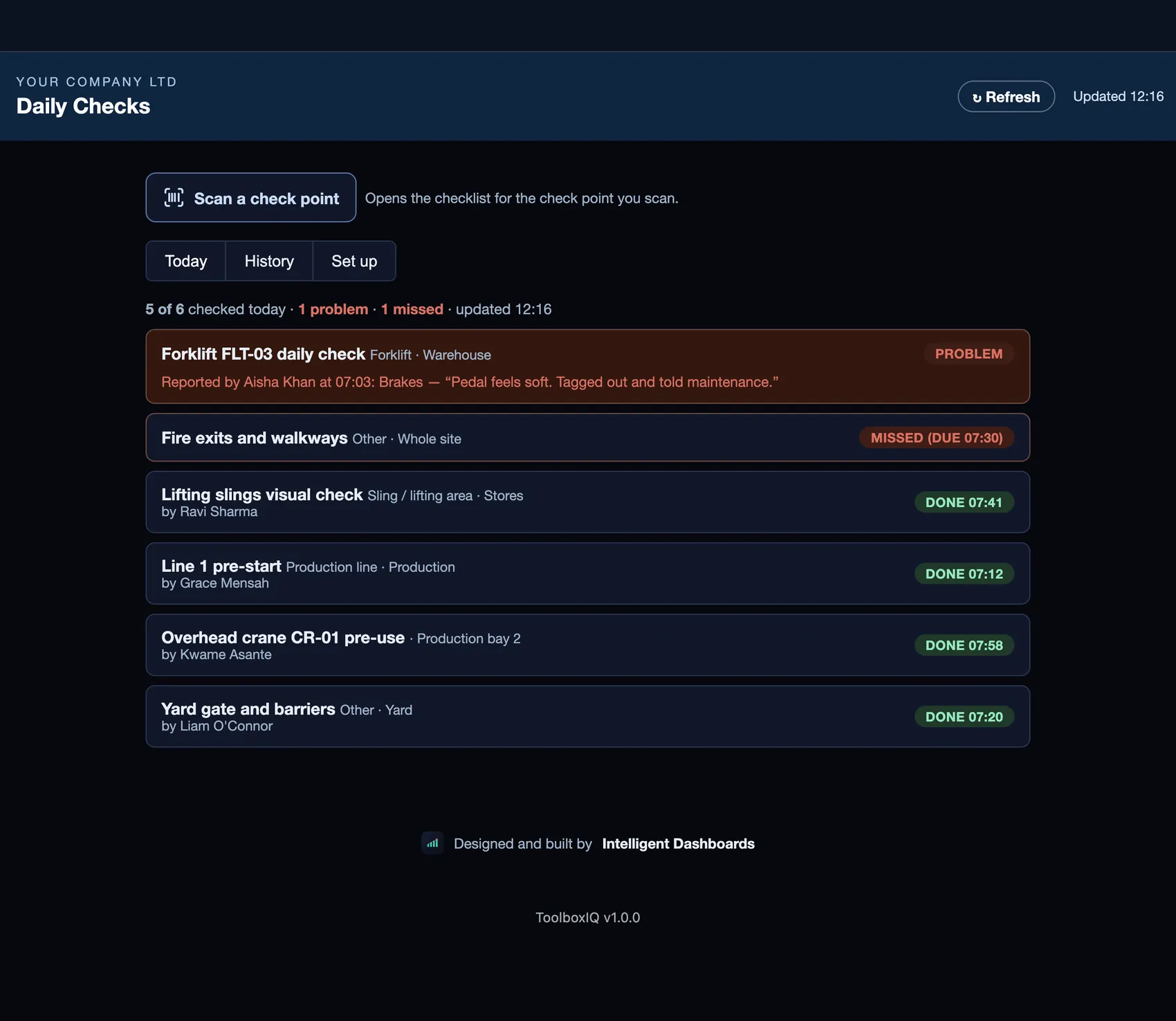
ToolboxIQ Daily Checks screen (sample data)
Same-day problems

Forklift and fire-exit checks, with problems and missed checks flagged.

Done on the phone in a minute, and shown on the Daily Checks screen the same day.

On site
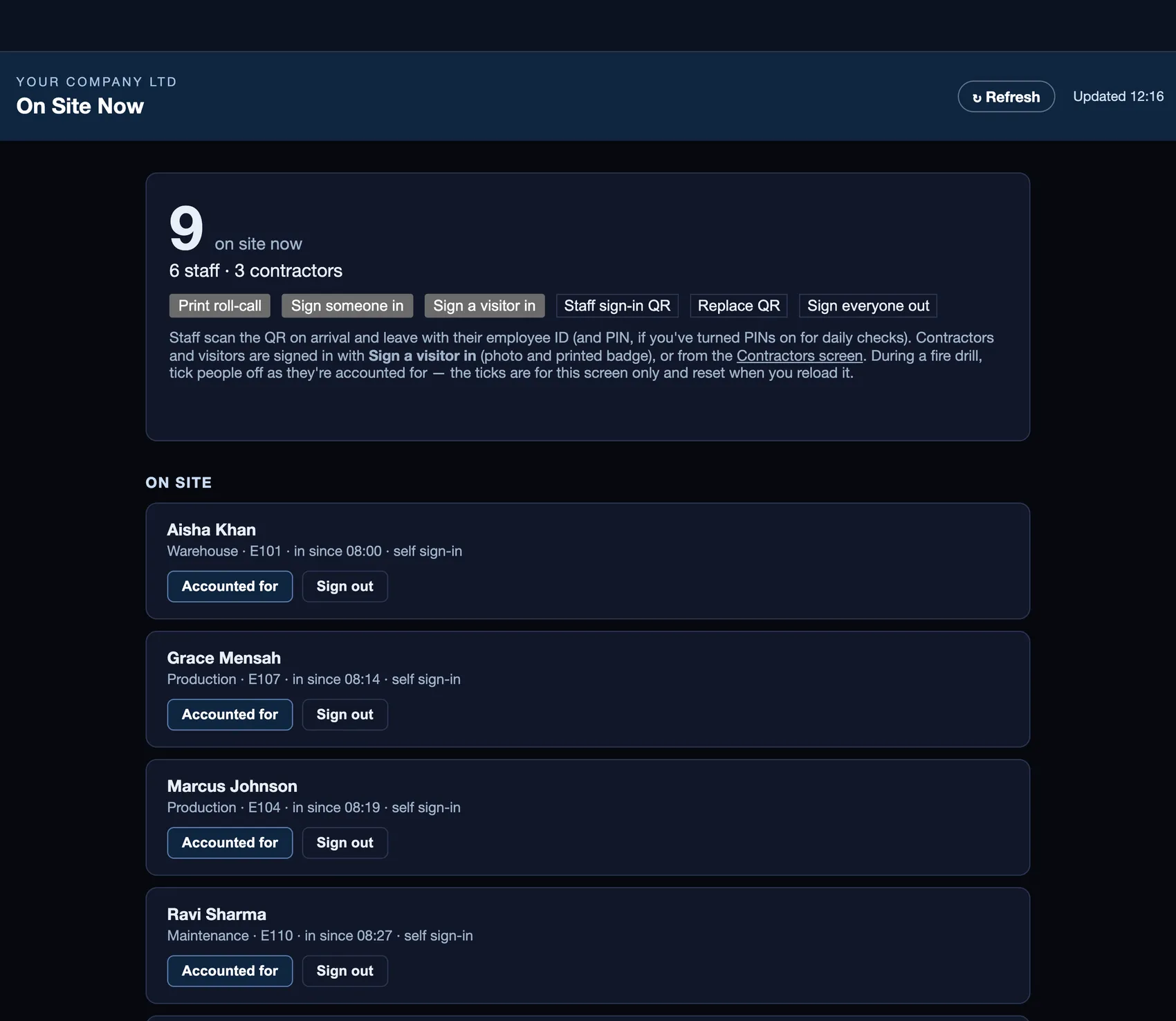
ToolboxIQ On Site Now list (sample data)
Live roll call

Know who is on site now.

Visitor sign-in with badges, and a live list of staff, contractors and visitors. An optional module, switched on per company.

ToolboxIQ helps you record incidents, apply the RIDDOR criteria and keep the evidence. The decision to report, and the report to the HSE, stay with your responsible person. It is a management tool and does not replace your statutory duties or a competent person's advice. Take the five-minute interactive guide →

Everything ToolboxIQ surfaces, in one place.

◉

SOP & Risk Assessment library

Every SOP and Risk Assessment in one place, with a required read-and-sign-off and an optional quick-check quiz before it counts as done.

✨

Draft with AI

Starting from nothing? Type a topic — "manual handling of steel pallets" — and get a proper first draft (purpose, scope, key risks, controls) in seconds, ready to review and edit rather than a blank page. Alongside bulk CSV import and a starter content pack, so there's no version of "getting your library in" that starts from zero.

✓

A training sign-off matrix

Every employee against every SOP and RA, re-confirmed every three months by default — so who's current and who's overdue is a screen, not a search.

🗣

Toolbox talks

Short scheduled safety briefings with their own attendance record, separate from the full SOP library.

⚠

Incidents & equipment register

Incidents and near misses logged through to close-out; forklifts, press tooling and lifting gear on a PUWER/LOLER-style inspection cycle with a next-due date that surfaces before it lapses.

⚑

Permits & contractors

Hot work, confined space and working-at-height permits raised, authorised and closed out; contractor induction and insurance tracked, with a site sign-in/out log.

▣

One actions register, licences & My Training

One actions register that pulls in every corrective action — however it was raised: a failed equipment check, an incident, a permit close-out, an SOP review — so nothing gets tracked twice or missed because it lived on a different form. Forklift licences and first-aid certificates tracked to expiry. One shared "My Training" QR code — not one per document — shows each person just what's overdue or due for them.

▤

Built for the warehouse floor

Runs on shared handsets and rugged devices that run a modern browser, and works with any Bluetooth or USB scanner that types like a keyboard — scan a daily-check QR, an equipment tag or a document and it opens the right screen. Shared handsets sign the last person out after a set idle time, with a one-tap Switch user, glove mode, high contrast and larger text. With no signal, SOPs, risk assessments, equipment and the staff roster stay readable, and new incidents, equipment inspections, actions and talk attendance queue on the device and send when it reconnects.

⇄

Training that chases itself

Assign an external course, with its link, to named staff with a due date. They mark it started and completed from My Training, upload the certificate from their phone (photo or PDF), and a manager accepts it or sends it back with a note. Qualifications expiring within 30 days are flagged for a refresher, and the course link goes out in the staff reminder email.

⚿

Enterprise sign-in

Single sign-on with Microsoft Entra ID can be set up for firms that use it, so access can follow people as they join, move and leave. Two-factor sign-in is supported, every change is audit-logged, and all hosted data sits in London.

🎥

Screen-recorded evidence, tags & Slack

Attach a screen recording as evidence on an SOP, RA or incident — useful for a process walkthrough words don't capture. Tag and search everything across the library, and post a weekly compliance digest straight to your team's Slack channel.

Stop chasing sign-off with a laminated folder and a spreadsheet.

Most shop floors run their SOPs from a laminated folder and a spreadsheet nobody trusts to be current. ToolboxIQ keeps the SOP, the sign-off record and the equipment inspection cycle in the same place your team already works from — illustrative demo figures shown, your real data once it's live.

ToolboxIQ detail
ToolboxIQ — Dashboard
✓

A dated sign-off record you can print on the spot

Every SOP and RA read-confirmation dated, timestamped and printable on the spot — not a signature sheet pinned to a noticeboard.

⚑

Equipment inspections that don't quietly lapse

A forklift or crane's next-due date surfaces on the dashboard before it becomes a PUWER gap an inspector finds first.

⤢

Shaped to your shop floor

Built around your own SOPs, your own departments and your own equipment inspection cycles — not a generic template library relabelled with your logo.

No three-year contract. Set up for you. Data kept in the UK.

You'll probably look at a few options, so here's a fair side-by-side view of the terms that matter most to a growing firm. Every competitor fact comes from that company's own published pages, checked 01-10-2026. Terms change, so check them with each supplier before deciding.

ToolboxIQCitation (Atlas)BrightSafe (BrightHR)HandsHQMitti (formerly SafetyCulture)
Minimum contractNone. Monthly rolling"Typically three years or longer"; headline pricing based on a 7-year termFixed 24, 36 or 60 months12 monthsMonthly or annual
RenewalNothing to renew or give notice onRenews for the same length unless you give 6 months' written noticeSee their termsRenews for a further 12 monthsRenews at their then-current rates
Published price (ex VAT)£19/£15/£12 per employee per month (1–20 / 21–50 / 51–100), billed monthly in arrearsNot published: quote onlyFrom £2 per employee per monthFrom £275/month (10 users), £550 (25), £750 (60), billed annuallyUS$24 per seat/month annually, US$29 monthly; free up to 10 users
Set-upDone for you in a 30-day pilot. The fee is credited by credit note against your invoices if you continueSet-up costs spread across the termNot statedSet-up fee charged; amount not publishedNone stated
Price changesRate drops after 12 months of continuous paymentCan rise yearly by 3% or RPI, whichever is greaterFixed for the termMay rise at each renewalRenews at their then-current rates
Expert advice & site visitsNot included. Pair us with your own H&S consultantIncluded: 24/7 advice line, yearly consultant site inspections, legal-fee cover up to £1.5mIncluded: 24/7 H&S advice lineSoftware onlySoftware only
Where your data is heldUK (London)Not stated on their websiteUK and EEAEU, with some backups in the USUS, Ireland or Australia; no UK region stated
Taking your data with youExport everything at any timePDF export of recordsPDF export per recordCSV and PDF exportBulk CSV/Excel; export before your term ends

A fair note: if you want an advice line and consultant site visits bundled into one contract, Citation or BrightHR may suit you better. If you want the software without a multi-year contract, set up for you, with your data kept in the UK, that's ToolboxIQ. Many firms use us alongside the H&S consultant they already trust. Sources: citation.co.uk (pricing, contracts FAQ, H&S software page, client T&Cs PDF uploaded Nov 2025), brighthr.com (BrightSafe, pricing) and G-Cloud 14 listing 759348748925044, handshq.com (pricing, terms updated 08-07-2026, security) and HandsHQ's G-Cloud 14 listing 200014296043277, mitti.com (pricing, terms updated 21-09-2026, help centre). Download the one-page comparison (PDF)

Start safely

30-day set-up pilot

£250 + VAT (up to 50 staff) or £500 + VAT (51–150). We load your staff, sites and first five SOPs or risk assessments. If you continue, the pilot fee is credited by credit note against your invoices (no cash value; any unused balance lapses if you cancel).

If it doesn't take

Refund if fewer than half have signed

If you do your part (staff list and documents in the first week, QR codes up, documents assigned) and fewer than half the people assigned a document have signed it 21 days after set-up (or Day 30 if later), we refund the pilot fee. Conditions apply, and they are set out in the pilot agreement.

No lock-in

Leave whenever you like, data included

Monthly rolling, billed in arrears. Cancel for the end of any month and take a full export of your records with you.

Built with our customers, and still being built.

Our team keeps innovating on ToolboxIQ, and firms tell us what their sites need. There have been 9 ToolboxIQ updates since 23 Sep, each one dated on What's new.

3 Oct 2026

Visitor sign-in

Sign visitors in at the gate with a photo and a printed badge.

3 Oct 2026

Contractor site requirements and DBS checks

Set what each site requires of contractors and see whether they meet it before a permit is issued.

3 Oct 2026

Easier training assignments

Assign training to several people at once, with due dates and ready-made packs for each role or new starter.

The full compliance loop, targeted to the people who need it.

ToolboxIQ ships with everything a manufacturing or trades team needs to replace a folder and a spreadsheet — including per-role targeting and a full version history, built around real shop-floor SOPs, permits and equipment cycles, not a generic template library.

Live

Sign-off · incidents · equipment · permits · contractors

SOP/RA sign-off, toolbox talks, incidents, an equipment inspection register, permits to work, contractor management, one actions register, licence tracking and QR deep links — working today.

Live

Per-role & department assignment

Target specific SOPs and Risk Assessments at specific people or departments — a targeted document is required reading for whoever it's assigned to, and the Training Matrix shows a neutral "not applicable" for everyone else instead of a false "never signed" alarm.

Live

Version history & change log

An append-only, tamper-evident history for every SOP and RA edit, with a line-by-line diff between versions and a record of exactly which version each sign-off actually covered.

Opt-in module

Permit to work (advanced)

Hot work, confined space, working at height, electrical isolation, excavation, lifting and more, each with a pre-issue checklist that must be ticked before the permit can be issued. Requested, authorised, issued, live, suspended or resumed, handed back and closed, with extensions and shift handovers recorded.

Opt-in module

Contractor management

Accreditations (CHAS, SSIP, Constructionline, SafeContractor and others) with expiry dates, a no-login prequalification form, an online induction with a server-graded quiz, and gatehouse or self sign-in and out. Insurance, accreditation and induction expiries are chased at 30, 14 and 0 days.

Opt-in module

Sites & group view

For an operator with several sites: central EHS sees every site side by side, a site lead sees and manages only their own, and the database enforces that separation rather than the screen. A site picker filters every register and dashboard.

ToolboxIQ structures your SOPs, risk assessments and sign-off records — it is a management tool, not a substitute for your statutory health & safety duties or professional advice. Confirm your obligations with your own competent person. Full standards breakdown →

The questions that come up on every call.

Does ToolboxIQ report RIDDOR incidents to the HSE for us?+

No. ToolboxIQ helps you record an incident, prompts you against the RIDDOR criteria, shows a suggested decision with the reasons and the reporting deadline, and keeps the evidence. The decision to report, and the report to the HSE, stay with your responsible person. Check deadlines at hse.gov.uk/riddor.

Is there a free trial I can just click into?+

Not an automated one. Instead, we run a 30-day set-up pilot: £250 + VAT (up to 50 staff) or £500 + VAT (51–150). We set it up with your staff and your own SOPs. If you continue, the pilot fee is credited by credit note against your invoices (no cash value; any unused balance lapses if you cancel). If you do your part and fewer than half the people assigned a document have signed it 21 days after set-up (or Day 30 if later), we refund the pilot fee instead. Conditions apply. Access starts once the pilot fee or a PO clears, with no scoping call needed. Want to see it first? Book a walkthrough.

How is this different from Citation, BrightSafe or HandsHQ?+

Mainly the contract and the set-up. We're monthly rolling with no multi-year term or renewal notice, we set it up for you, and your data stays in the UK. Citation and BrightHR bundle advice lines (and, with Citation, consultant visits) into longer contracts, which suits some firms. See the side-by-side comparison.

Is my whole team charged, or just certain logins?+

Every employee tracked on your training matrix counts as a seat — including staff who only ever use the QR/PIN sign-off with no dashboard login of their own. Admin/management logins themselves don't cost extra on top.

What does it cost?+

£19/seat/month for up to 20 seats, billed monthly in arrears, tapering to £15/seat (21–50) and £12/seat (51–100) — stay 12 consecutive months and the rate drops automatically by a sixth, no prepayment or contract needed.

Can you add something our team needs?+

Tell us. Our team keeps building ToolboxIQ, and our customers' ideas shape what we build next. We publish the main updates with their dates on What's new. If a request will help other firms too, it goes on the list. If it's specific to your site, we'll say so and quote it separately. We don't promise dates until we've scoped it.

Can we import our existing SOPs and Risk Assessments?+

Yes — bulk CSV import is there if you want it, though most teams just start typing straight in or use ✨ Draft with AI for a first pass. No import is required to get going.

Can I trust a Risk Assessment "Draft with AI" wrote?+

Treat it as a first draft, not a finished document — it writes purpose, scope, key risks and controls from a topic so you're editing rather than starting from a blank page. A competent person still needs to review and sign it off before it's relied on.

Does it work on the warehouse floor, offline and on rugged handsets?+

Yes. It runs on shared handsets and rugged devices that run a modern browser, and works with keyboard-style scanners, and a shared handset signs the last person out after a set idle time. With no signal, reference data stays readable and new incidents, equipment inspections, actions and talk attendance queue on the device and send when it reconnects. Each queued item is only ever sent under the sign-in of the person who made it.

Can our IT team use single sign-on?+

Single sign-on with Microsoft Entra ID can be set up for firms that use it, so access can follow people as they join, move and leave. We set it up with your IT team on request.

Where does our data live?+

UK-hosted in a shared database (Supabase, London) with your team's data kept apart from every other customer by row-level security. There's no local-only mode — the whole point is one shared, always-current record your team reads from.

Prefer to see it as a book?

Pick your kind of business, check your sign-off evidence and tap through the real screens in five minutes.

Open the ToolboxIQ guide →

Still chasing SOP sign-off with a laminated folder?

We'll get your first SOPs and Risk Assessments in and your whole team signed up in one sitting.

You own your dataUK-hosted24/7 supportCyber Essentials certifiedICO registered · DPA available